
Kanto CDG Creator is a professional tool for creating and synchronizing CDG files with scrolling lyrics — perfect for karaoke, singers, musicians, and recording studios.
It allows you to import an audio file (MP3/WAV) and lyrics, then sync each line with millisecond accuracy.
🎤 Main Features
- Import audio and lyrics in just a few clicks
- Real-time synchronization using the SET button or the SPACEBAR
- Singer 1 / Singer 2 duet support — different colors per singer
- Live CDG preview during synchronization
- Instant export of the final CDG file
- Export in high quality MP4 video (1024×768, antialiased)
- Import and export lyrics in LRC format
- Modern dark theme and intuitive interface
- Progressive sweep highlight animation
- Optional countdown before playback
- Fully customizable color palette (16 colors)
Download the free version of the software using this button:

To unlock all features, remove the watermark and enable unlimited synchronization, you can purchase the PRO version using the following button:

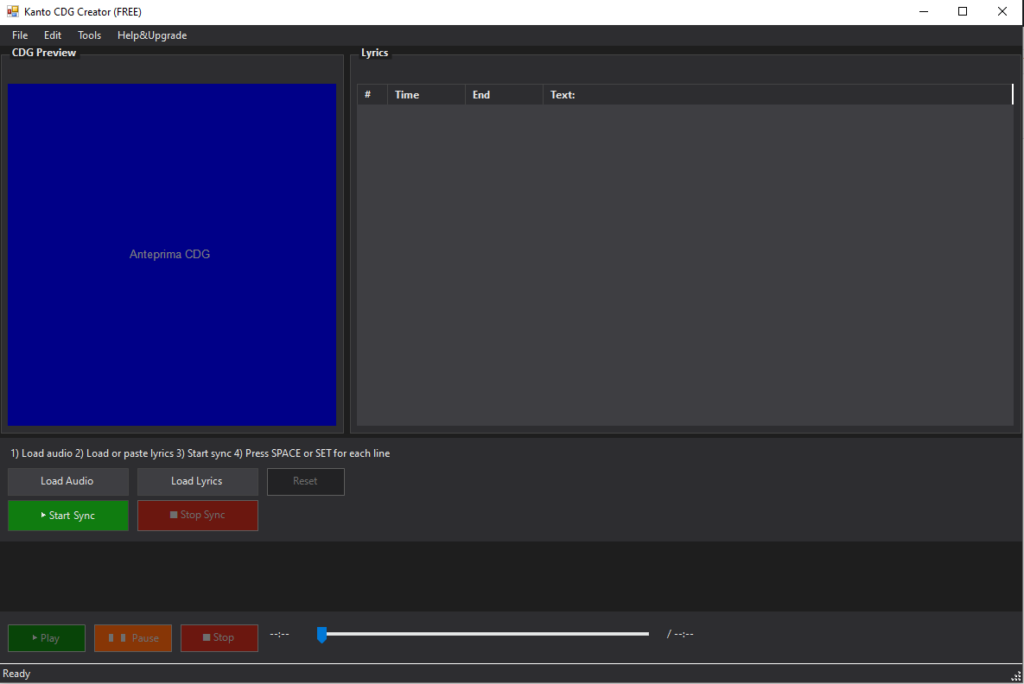
Here is how the program interface looks when launched:
📁 Step 1 – Load Audio and Lyrics
To get started:
- Click the Load Audio button and select a track (MP3 or WAV).
- If you already have a lyrics file, click Load Lyrics and select the file (.lrc or .txt).
Or copy the lyrics from a webpage or document, then right-click inside the Lyrics box and choose Paste from Clipboard.
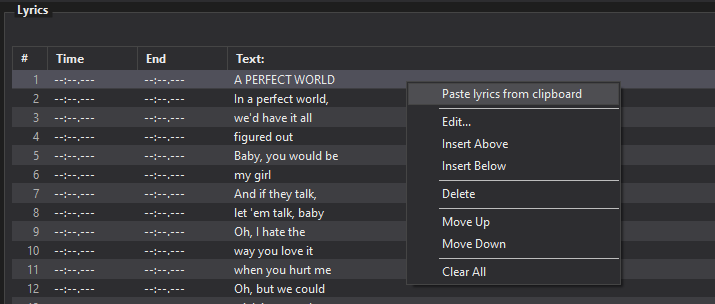
The text will automatically be divided into lines and displayed in the Lyrics table.
⏱️ Step 2 – Start Synchronization
After importing audio and lyrics, press:
▶ Start Synchronization
The song will start playing and you can sync each line using:
- SET Button → marks the beginning of a lyric line
- Spacebar → a fast shortcut alternative
Each time you press SET, the selected lyric line is aligned to that exact moment in the song.

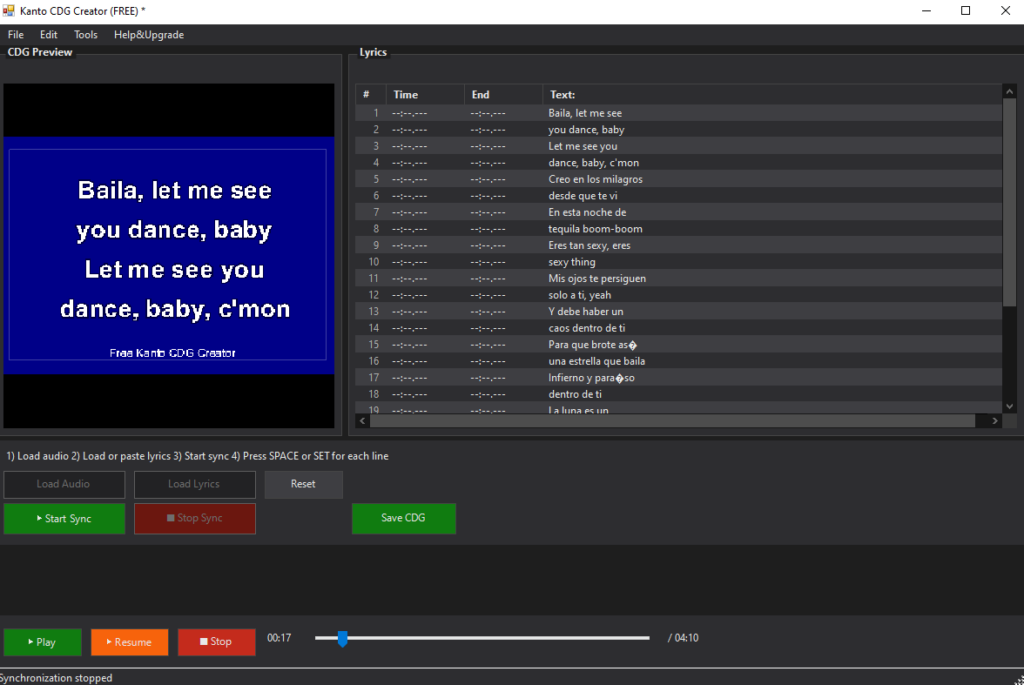
👁️ Real-Time Preview
During synchronization, the CDG preview shows:
- 💬 The synced lyrics
- ⚡ Progressive word highlighting (sweep effect)
- 🎶 A classic CDG karaoke layout
- 🎤 Different colors for Singer 1 and Singer 2 (if assigned)
🆘 Mistakes?
- Reset → clears all synchronization
- Pause / Play → audio controls
- Double-click any line to adjust its timestamp, text, or singer assignment
🎤 Singer 1 / Singer 2 — Duet Mode
Kanto CDG Creator supports two-singer duets natively. You can assign each lyric line to a specific singer, and the CDG file (or MP4 video) will display them in different colors automatically.
Default color scheme:
- Singer 1 — White text, Yellow highlight (classic karaoke style)
- Singer 2 — Cyan text, Magenta highlight (clearly distinguishable)
Both colors are fully customizable in the Settings → Colors tab.
How to assign Singer 2 to a line:
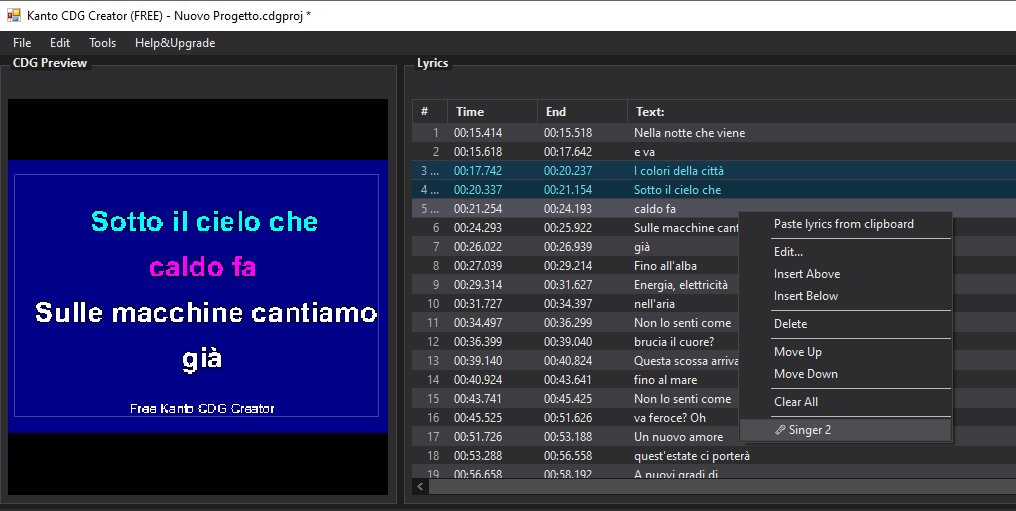
Method 1 — Right-click context menu:
- Select the lyric line in the list
- Right-click → choose 🎤 Singer 2
- The row will turn cyan in the editor, with a ♪2 badge in the number column
- Right-click again to revert to Singer 1
Method 2 — Double-click to edit:
- Double-click any lyric line to open the edit dialog
- Check the 🎤 Singer 2 checkbox
- Click OK to confirm
Singer assignments are saved with the project and also exported in the LRC file using the inline [S2] tag, so they are preserved when re-importing lyrics.
💾 Final Step – Export CDG or MP4
Once all lines are synced correctly, press:
💾 Save CDG or MP4

CDG File
The standard CDG format is universally compatible with karaoke players. The exported file is ready to use with:
- Kanto Karaoke Player
- KaraFun (CDG supported mode)
- Any standard CDG karaoke software or hardware player
📹 MP4 Video Export
Kanto CDG Creator can also export a high-quality MP4 video (1024×768 resolution) with the karaoke lyrics rendered directly on screen. This is ideal for:
- Uploading to YouTube or social media
- Playing on TVs or projectors without dedicated karaoke software
- Sharing with singers as a practice video
- Archiving karaoke tracks in a widely supported video format
The MP4 export uses antialiased rendering (GDI+), meaning text appears much sharper and smoother than in the standard CDG file.
⚙️ Advanced Options
Kanto CDG Creator includes a wide range of advanced settings to customize both the visual style and behavior of the final CDG karaoke file.
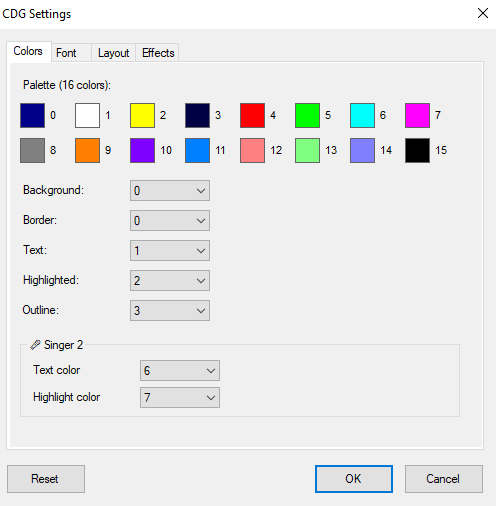
🎨 Colors
- Palette (16 colors) — Click any color swatch to edit the full palette used in the CDG file.
- Background — The fill color of the entire screen.
- Border — The thin frame surrounding the CDG visible area.
- Text Color — Default lyric color before singing (Singer 1).
- Highlight Color — Color shown as words are being sung (Singer 1 sweep).
- Outline Color — Border drawn around each letter for contrast.
- Singer 2 — Text Color — Default color for Singer 2 lines (default: Cyan).
- Singer 2 — Highlight Color — Sweep color for Singer 2 (default: Magenta).
🔤 Font
- Font Family — Select the typeface. Common choices: Arial, Verdana, Impact.
- Text Size — Adjust lyric size for large screens or distant viewing.
- Bold — Makes lyrics heavier and more readable.
- Outline / Outline Width — Adds a border around letters to separate them from the background.
📐 Layout
- Line Spacing — Extra vertical space between lyric lines.
- Text Alignment — Center (most common), Left, or Right.
- Word Wrap — Maximum words per line before automatic wrapping.
- Max Characters Per Line — Limits line width; long lines are split automatically.
- Margins — Controls how close lyrics appear to each edge of the screen (Left, Right, Top, Bottom).
✨ Effects
- Sweep Highlight — Enables progressive left-to-right highlighting as the line is sung.
- Sweep Speed — Controls how fast the highlight animation advances (ms per character).
- Pre-Display (ms) — Shows lyrics on screen before they are sung, giving the singer time to prepare.
- Highlight Advance (ms) — Starts the highlight slightly before the marked timestamp — useful for fast sections.
- Initial Countdown — Adds a 1–10 second countdown before the first lyric appears.
Kanto CDG Creator makes it easy for anyone — even beginners — to produce high-quality karaoke tracks with precise timing, smooth highlighting, and a professional appearance.
Whether you’re creating tracks for personal use, live shows, karaoke bars, or commercial production, this tool allows you to achieve polished results in just a few minutes.
Happy Syncing! 🎶