
Syncing lyrics in MIDI karaoke files (MID/KAR) can be surprisingly tricky: many tools are outdated, workflows are confusing,
and manual editing of MIDI events is time-consuming and error-prone. MidiLyricsSyncPro was created to make this
process fast, visual, and reliable. It lets you load a MIDI, paste or import the song text, and then sync words to the music
by tapping SET (or the Space key) while the track plays.
The goal is simple: help you produce a clean, player-friendly MIDI file with properly timed lyrics,
without forcing you into complicated MIDI editors or technical event tweaking.
What MidiLyricsSyncPro Does
- Load .MID or .KAR files
- Paste lyrics directly, or import them from a text file
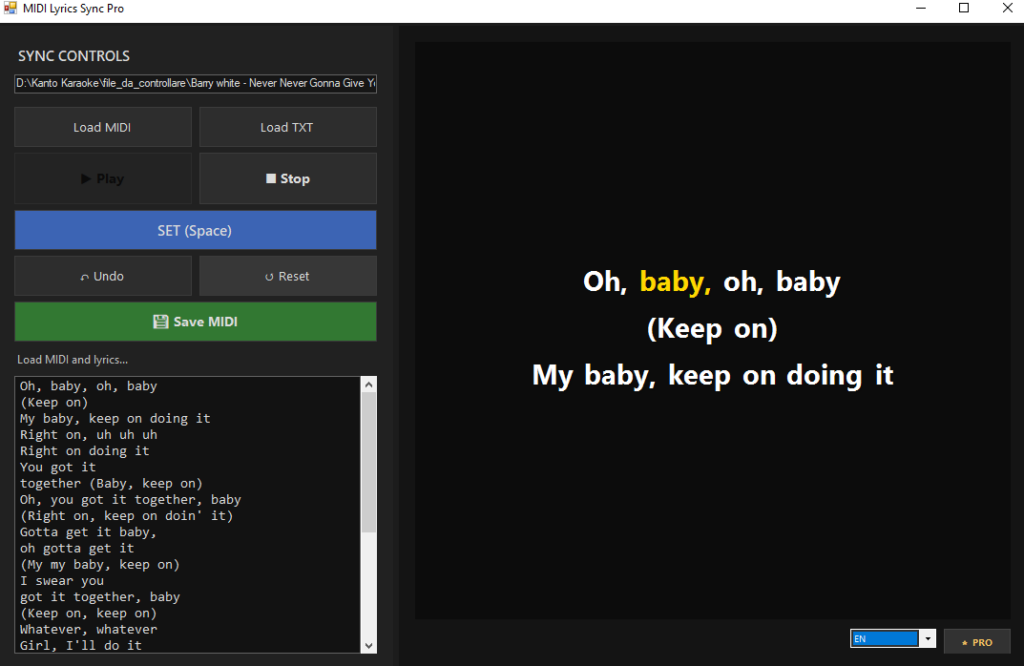
- Preview the lyrics in a dedicated TV-style karaoke screen
- Play the MIDI using the standard Windows MIDI output (Microsoft GS Wavetable Synth)
- Sync words one by one by tapping SET or pressing Space
- Save a new MIDI with word-level timing and proper line breaks
DOWNLOAD NOW THE FREE VERSION


PURCHASE PRO VERSION
The exported file is designed for broad compatibility with common karaoke MIDI players. The software writes lyrics in the
most widely supported location used by karaoke MIDIs: Track 0 (Conductor Track)
Design Philosophy
MidiLyricsSyncPro is a specialized tool—not a full DAW or a heavy MIDI sequencer. It focuses on what matters for karaoke text
timing:
- Lyrics-first workflow: the text and timing are the core of the experience.
- Simple, guided steps: load MIDI, load/paste text, press Play, then tap to sync.
- Predictable playback: uses the Windows internal synth so you don’t need external drivers.
- Clean output: old text data can be removed to avoid conflicts, then rebuilt as synced lyrics.
Interface Overview
The interface is designed to stay clear and practical during syncing sessions.
TV-Style Lyrics Preview
On the right side you’ll see a preview that behaves like a karaoke TV screen:
- Dark background
- Centered white text
- Current word highlight in yellow
- Line breaks based on your original text formatting
This preview is not just “for show”: it helps you confirm pacing and readability while you sync.
How to Use MidiLyricsSyncPro (Step-by-Step)
DOWNLOAD NOW THE FREE VERSION
1) Load the MIDI / KAR File
Click Load MIDI and choose your .mid or .kar file. The file will be prepared for playback and syncing.
2) Paste or Import the Lyrics
Paste your text into the lyrics box or import it from a file. You can keep the formatting you want:
line breaks you type or paste are preserved and will be written into the final MIDI as proper karaoke line breaks.
3) Press Play
Click Play to start the track. MidiLyricsSyncPro uses the Microsoft GS Wavetable Synth,
which is the standard Windows internal MIDI output. This ensures a consistent preview without requiring external devices.
To prevent mistakes, the SET button is enabled only after playback starts.
4) Sync Words with SET (or Space)
While the MIDI plays, press SET (or the Space key) on each word exactly when it should be highlighted.
Each tap assigns the current word to the current MIDI tick/time.
This “tap-to-sync” approach is extremely fast and natural—especially when working with karaoke phrasing.
5) Fix Mistakes (Undo / Reset)
If you tap too early or too late, you can use:
- Undo to remove the last synced word
- Reset to clear all sync data and start over
After a reset, no word is selected, keeping the workflow clean and predictable.
6) Save the Synced MIDI
Click Save MIDI to export a new file. MidiLyricsSyncPro writes the synced lyrics in
Track 0 (Conductor Track) for best compatibility. The output includes word-level events and your original line breaks.
If you need to verify what was written, the software can generate a debug report listing the lyric events and their ticks.
Audio Playback Notes
MidiLyricsSyncPro is optimized for preview playback during syncing. It relies on the standard Windows synth
(Microsoft GS Wavetable) to give you a reliable reference while tapping. Keep in mind that some MIDI files depend on specific
device features (GM/GS/XG), sound banks, or advanced SysEx initialization. The playback inside MidiLyricsSyncPro is designed to
be practical and consistent—not a replacement for a full karaoke player.
After saving, it’s always recommended to test the final file in your preferred karaoke player (for example, VanBasco or Karaoke5)
to confirm the end-user experience.
Who Is This For?
- Karaoke creators and editors working with MIDI/KAR libraries
- Musicians and singers who want timed lyrics for rehearsals and performances
- Studios and producers preparing karaoke-ready backing tracks
- Anyone who needs a fast, visual tool to sync words without complex MIDI editing
PURCHASE PRO VERSION
Conclusion
Kanto Midi Lyrics Sync Pro turns a historically tedious task into a straightforward workflow:
load your MIDI, paste your lyrics, press play, then tap to sync. The TV-style preview and word-by-word timing make it easy
to produce clean karaoke lyrics while keeping your original formatting and line breaks.
If you regularly work with MIDI karaoke files and want a modern, practical solution for lyric timing, MidiLyricsSyncPro is built
exactly for that job.