Kanto AI Vocal Remover: Create Professional Karaoke Tracks
If you love karaoke, produce cover songs, or work in audio editing, you’ve probably asked yourself the same question at least once: “How can I remove the vocals from a song while keeping the instrumental high quality?” For many years, the answer was disappointing: “You can’t do it well,” or “You need advanced audio mixing skills and expensive plugins.”
Today, artificial intelligence has changed everything. Kanto AI Vocal Remover is a Windows application designed for one purpose: to isolate the vocal track from the instrumental part of any song, producing a clean karaoke-ready backing track with just a few clicks.
DOWNLOAD FREE VERSION
Select Windows or MAC version


To unlock all features, remove the audio watermark and enable unlimited synchronization, you can purchase the PRO version using the following button:

What Is Kanto AI Vocal Remover
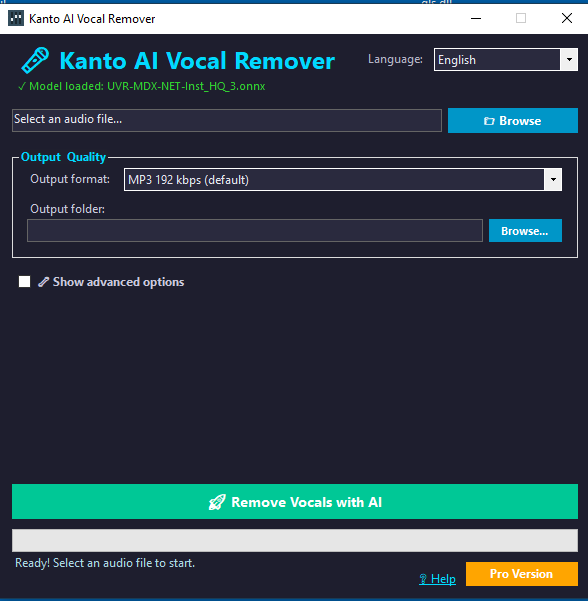
Kanto AI Vocal Remover is a Windows software powered by an AI engine using modern ONNX models to intelligently separate voices and instruments. Unlike old “center cancellation” tricks, stereo inversion, or simple equalization methods, Kanto analyzes the full frequency spectrum and detects the vocal content, separating it from drums, bass, guitars, synths, and other instruments.
The result is a significantly cleaner instrumental track that can be used for:
- Karaoke (bars, live events, private parties)
- Cover versions for YouTube, TikTok, Instagram, and other platforms
- Vocal training using backing tracks close to the original mix
- Editing and audio production for DJs and content creators
The software is designed to be easy to use for anyone, but also provides a dedicated Advanced Options section for users who want maximum quality with settings like denoise, TTA (Test Time Augmentation), overlap, and processing shifts.
How to Use Kanto AI Vocal Remover (Step-by-Step)
Kanto AI Vocal Remover features a clean modern dark UI to reduce eye strain during long sessions and to give a studio-like professional feeling. Getting your first karaoke backing track only takes a few simple steps:
1. Select an audio file
Click the Browse button to choose the audio or video file you want to process. Kanto supports a variety of formats, including:
- MP3
- WAV
- FLAC
- MP4 and other video sources (audio is extracted automatically)
Once the file is selected, you will see the full path and the “Remove Vocals” button will be enabled.
2. Choose the output format
In the Output & Quality section you can choose between:
- MP3 192 kbps (default)
- MP3 320 kbps (highest quality MP3)
- WAV 32-bit float (maximum quality, perfect for DAW editing)
By default the app saves the output file in the same folder as the original audio, adding the suffix _vocalremoved to the filename (for example: mysong_vocalremoved.mp3).
3. Adjust the vocal level (optional)
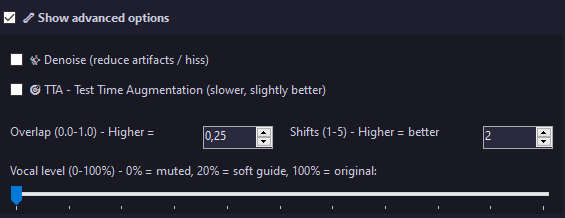
One unique feature in Kanto AI Vocal Remover is the Vocal Level control. By default it is set to 0%, meaning the vocal is completely removed. However, if you are practicing a song and want a subtle guide, you can increase the vocal level to:
- 5–15% (very faint vocals for reference)
- 20–30% (a more audible guide while preserving the instrumental)
This makes Kanto perfect not only for karaoke but also for rehearsals and vocal training.
4. Use advanced options (optional)
If you want to refine the quality, open the Advanced Options panel and adjust:
- Denoise – reduces high-frequency artifacts and hiss
- TTA (Test Time Augmentation) – performs multiple analysis passes and averages the results
- Overlap – controls the amount of overlap between chunks to make transitions smoother
- Shifts – number of augmentation passes used when TTA is enabled
These settings allow experienced users to squeeze the best possible output from the AI engine. However, beginners can simply ignore this section – default settings already deliver excellent results.
5. Start the AI vocal removal
Click Remove Vocals with AI. During the process you will see:
- A progress bar showing processing status
- A status line indicating what the engine is doing (loading, chunk processing, saving file, etc.)
Once finished, the app will display a confirmation message with the output file path. You can immediately play the new instrumental with any audio player or karaoke software.
Advantages Compared to Online Vocal Remover Services
You may already have tried some online vocal remover tools. There are many free websites claiming to remove vocals automatically, but most of them produce very limited results because of how they work and the restrictions they have. Here are the most important benefits of using Kanto AI Vocal Remover instead of online alternatives:
1. Full AI model, not a simplified web version
Online vocal removers almost always use a lightweight model optimized for speed and low server cost. Kanto uses a full-resolution ONNX model locally on your computer, providing better separation and cleaner instrumentals.
2. No compression, no upload limits
Web services must upload your audio to a remote server, then stream back the result:
- You lose time uploading big files
- Your track may be compressed to save bandwidth
- Some sites limit input length (e.g., 10 minutes max)
Kanto processes everything locally on your PC: no upload time, no size limits, and no quality degradation.
3. Privacy and ownership
Uploading your song to a third-party server means sending copyrighted content online. If you are working with private recordings, rare tracks, studio sessions or professional projects, this is not ideal.
With Kanto, your audio never leaves your computer. You keep full privacy and control of your project files.
4. Consistent quality and adjustable settings
Online tools are usually “black boxes”: you click a button and accept whatever result you get. There are no settings for improvement.
Kanto gives you full control:
- Vocal level
- Denoise and smoothing
- TTA and number of analysis passes
- Overlap and fade windows
- MP3 bitrate or WAV float output
This allows you to fine-tune the output depending on the genre: pop, metal, hip-hop, EDM, jazz, acoustic, and more.
5. Faster for multiple tracks
If you produce karaoke regularly, you may need to process dozens of songs. Doing this online means repeating the same cycle over and over: upload, wait, download, and so on.
Kanto lets you process tracks in sequence without waiting for servers. On modern CPUs and GPUs, it’s significantly faster than any purely web-based workflow.
6. No hidden compression or watermark online
Many online services introduce hidden compression, audio artifacts, or audible watermarks unless you pay monthly subscriptions. Kanto uses your own computer for processing, so:
- No hidden dynamic range compression
- No unexpected MP3 re-encoding or quality loss
- No external watermark except the local free-demo watermark after 30 seconds
This makes it highly suitable for professional use, where consistency and reliability are essential.
Free Version vs PRO Version
Kanto AI Vocal Remover comes in two modes:
- Free version: full AI processing, ideal for testing quality
- PRO version: unlocked features and no audio watermark
In the Free version, the processed instrumental includes a short audio watermark at around 30 seconds saying “demo”. This lets you try the engine on unlimited songs before upgrading.
In the PRO version (activated with a license code), there are:
- No watermarks
- No limitations
- Full output quality for professional work
You can open the registration window directly from the app and activate the PRO mode instantly.
Why Kanto AI Vocal Remover Is the Best Choice
Here is a summary of why Kanto stands out compared to typical online and offline solutions:
- Advanced AI engine based on high-quality ONNX models
- Professional dark UI for a studio-like workflow
- One-click experience for beginners
- Vocal level control to keep a reference voice if desired
- Powerful advanced settings for sound engineers
- No upload, no privacy risk compared to online tools
- Faster batch processing without waiting for remote servers
- Multiple output formats including MP3 192/320 kbps and WAV 32-bit
- Free version to test real AI quality
- PRO version without any limitations or watermarks
Conclusion
If you are looking for a reliable, easy-to-use, and powerful solution to remove vocals from songs and create professional karaoke tracks, Kanto AI Vocal Remover is designed exactly for that.
Thanks to AI, you no longer need complex audio plugins or technical experience: just import the song, choose your output format, adjust vocal level if needed, and let the AI engine do the rest.
Whether you’re a karaoke enthusiast, a singer practicing at home, a content creator, or a music producer, Kanto AI Vocal Remover can become a powerful tool in your everyday audio workflow.
DOWNLOAD FREE VERSION
Select Windows or MAC version
To unlock all features, remove the audio watermark and enable unlimited synchronization, you can purchase the PRO version using the following button: